Crayon Pen Wrap Canva Frame: Your Shortcut to Custom Designs
If you have ever tried to create custom pens, pencils, or cylindrical packaging for a small business or event, you know the struggle of measuring and aligning graphics. It is rarely as simple as it looks. The Crayon Pen Wrap Canva Frame Template is designed to eliminate that frustration entirely. This is not a static image file or a complicated vector program that requires technical expertise. It is a fully editable digital environment built specifically for Canva users who want professional results without the steep learning curve.
Visually, the template embodies a playful yet practical aesthetic. It is built to handle the kind of vibrant, whimsical designs often associated with back-to-school season, creative stationery, and children’s branding. However, because it functions as a frame, it acts as a neutral vessel. Whether you want to apply a retro 90s aesthetic, a minimalist corporate look, or a chaotic scrapbook style, the transparent layer structure ensures your art sits perfectly on the template without distortion. The "crayon" aspect suggests a tactile, fun personality, making it an excellent foundation for designs that need to feel approachable and energetic rather than rigid and formal.
Understanding the Digital Asset
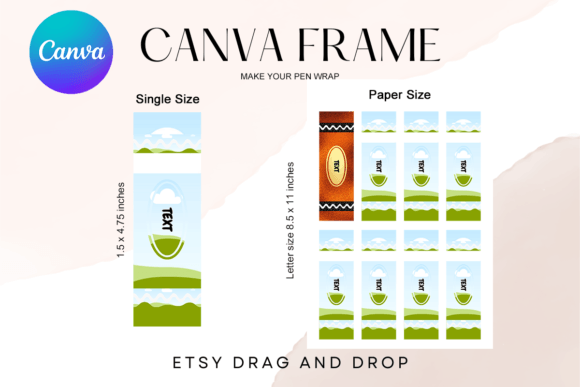
It is important to clarify exactly what this product is, as digital assets can often be confusing. You will receive 1 PDF File which contains the necessary links to access your templates in Canva. There are no props included, and no physical product will be shipped to your door. Instead, you gain access to 2 custom-made Canva frames.
The utility of this package lies in its specificity. You receive two distinct sizes to cover different production needs:
- Single Size: 1.5 x 4.75 inches. This is the precise dimension needed for standard pen wraps and pencil wraps. It is optimized for individual printing, allowing you to create one-off prototypes or small batches for personal use.
- Paper Size: 8.5 x 11 inches (8 Frame). This is the efficiency powerhouse. It arranges eight frames onto a single standard letter-size sheet. If you are running a small business and need to print 50 or 100 wraps, you simply design one frame, duplicate it across the master sheet, and print. This saves ink, paper, and cutting time.
The sizes provided are approximate, which is actually a benefit. Canva allows you to scale these elements up or down to suit your specific needs, meaning you aren't locked into a rigid pixel count. Furthermore, the template utilizes a transparent layer. This is crucial for vinyl sublimation and heat transfer printing, as it ensures that only your design transfers to the material, leaving no white background artifacts.
Strategic Applications for Brands and Creators
While this might seem like a niche tool for crafters, the Crayon Pen Wrap Canva Frame Template has significant value for professional brand identity and marketing. In a digital-first world, physical touchpoints have become powerful differentiators. A custom-branded pen included in a welcome kit or a direct mailer can increase brand recall significantly more than a generic promotional item.
For entrepreneurs and small business owners, this template offers a way to create high-end branded merchandise without hiring a graphic designer for every small batch. You can test different designs for different seasons—spring florals, holiday themes, or product launch graphics—quickly and affordably. Because the template is editable, you maintain full control over the visual hierarchy of your wrap. You can ensure your logo is prominent, your contact info is legible, and your brand colors are accurate.
Content creators and bloggers can also leverage this for merchandising. If you have an audience that appreciates stationery, offering custom-designed pen wraps as a digital download or a physical product is a low-overhead way to monetize your brand. The "crayon" style specifically targets niches like parenting blogs, educational content, art therapy, and back-to-school guides.
Designing with Purpose: Practical Guidance
When working with the Crayon Pen Wrap Canva Frame Template, the focus should be on clarity and durability of design. Because the surface area of a pen is small (1.5 inches wide), readability is your primary challenge. This is not the place for long paragraphs of text. Instead, focus on strong typography choices.
While the template itself is not a font, it dictates how you should use fonts. You should pair a bold, readable display font or block font for the main message with a clean sans serif font for secondary details like URLs or taglines. Avoid overly intricate script fonts or handwritten fonts for small text, as they can become illegible when printed on a curved surface and viewed at a distance.
Here are a few practical tips for getting the most out of this design asset:
- Color Psychology: Since the template evokes a crayon texture, lean into high-saturation colors. However, ensure there is enough contrast between your text and background to maintain professionalism.
- Pattern Use: Use the frame to create seamless patterns. A repeating logo or a geometric pattern can look incredibly sophisticated on a pen wrap, transforming a simple object into a piece of branded packaging design.
- File Management: Remember, this is an editable Canva template. It is not an PNG or SVG file. You must edit it within the Canva platform. Once your design is finalized, you can download it as a high-resolution PNG or PDF for printing.
For those concerned about commercial licensing, the ability to create physical products for sale using these templates is a major advantage. It allows you to produce inventory for Etsy shops, craft fairs, or corporate gift packages. The ease of drag & drop editing means you can iterate on designs rapidly based on customer feedback, ensuring your brand consistency remains high across all your merchandise.
Ultimately, the Crayon Pen Wrap Canva Frame Template