20oz Spit Canva Frame Tumbler Template: Streamline Your Custom Drinkware Design
In the world of custom drinkware, the 20oz tumbler is a staple. For designers, small business owners, and crafters, the process of creating a seamless, professional-looking wrap for a tapered or straight vessel can be a significant time investment. The 20oz Spit Canva Frame Tumbler Template addresses this directly, offering a digital solution that integrates into a familiar design platform. This is not a physical product or a static image file; it is an editable Canva template designed to provide a precise, transparent framework for your artwork, logos, and patterns. It’s a practical design asset built for efficiency and accuracy.
Understanding the Digital Template: Function Over Form
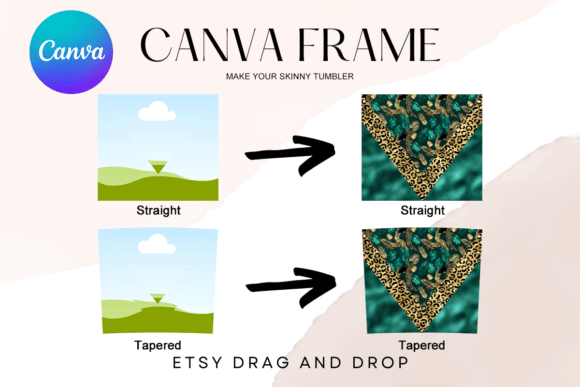
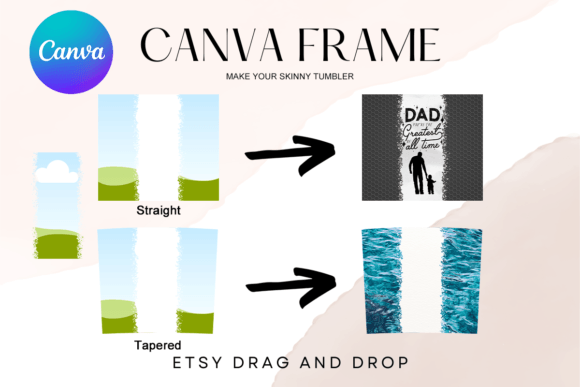
At its core, this template provides the structural blueprint for your tumbler design. You receive a PDF with a link to two custom-made Canva frames: one for a tapered 20oz tumbler and one for a straight version. Both are sized at approximately 9.3" x 8.2". The key feature is the transparent layer. This frame acts as a non-destructive guide, allowing you to drag and drop your graphics, text, and illustrations directly onto the canvas within the bounds of the tumbler's surface. The sizes are approximate for a reason—they can be scaled up or down to suit specific tumbler models or design preferences, offering necessary flexibility.
It’s crucial to understand what this is not. It is not a PNG or SVG file meant for direct cutting or printing. It is an editable environment. The visual "personality" of the template itself is neutral and utilitarian. Its appeal lies in its function: to eliminate guesswork in layout and proportion. For anyone working in packaging design or product customization, this translates to a more consistent and professional result. You're not wrestling with curved lines in a flat design program; you're working within a pre-constructed visual guide that mimics the final product.
Practical Applications for Designers and Entrepreneurs
The true value of the 20oz Spit Canva Frame Tumbler Template emerges in its application across various projects. For a small business owner selling custom tumblers, it streamlines the production process. Instead of measuring and remeasuring, you can focus on the creative work of building a brand identity on the tumbler itself. Upload your logo, apply your brand colors, and arrange your elements with confidence that they will align correctly when the design is applied to the physical product.
Crafters and hobbyists benefit from the same precision. Whether you're creating a gift for a wedding party or a personalized item for a friend, the template ensures your design is centered and properly scaled. For content creators and marketers, the template is a tool for creating mockups. Design a tumbler featuring a campaign slogan or a podcast logo to use in social media graphics, giving your audience a tangible sense of your branding. The ability to work in Canva makes this accessible, even for those who aren't proficient in more complex design assets like Adobe Illustrator.
Consider the workflow for a designer creating a line of tumblers for a client. Using this template, you can quickly generate multiple design variations—different colorways, pattern placements, and typographic layouts—all within a single Canva file. This facilitates client presentations and approvals. The transparent frame ensures that your background artwork extends properly to the edges without manual cropping, which is essential for sublimation printing where a seamless wrap is non-negotiable.
Integrating the Template into Your Design Workflow
Adopting this template into your process is straightforward. After accessing the Canva link, your first step is to prepare your design elements. This is where your skills in font pairing and composition come into play. Choose a typeface that is legible at the scale of a tumbler. A bold display font might work for a name or a short phrase, while a clean sans serif font is often better for longer text or contact information. Avoid overly intricate script fonts or handwritten fonts for small details, as they can become illegible when wrapped around a curved surface.
Drag your graphics onto the canvas and position them within the frame. Use the frame's edges as your guide for bleed and safe zones. Because the template is a transparent layer, you can easily toggle its visibility on and off to check your design against a plain background. This helps you evaluate the overall composition without the distraction of the frame lines. When you're satisfied, you can hide the frame layer entirely and export your final design as a PNG or PDF for printing.
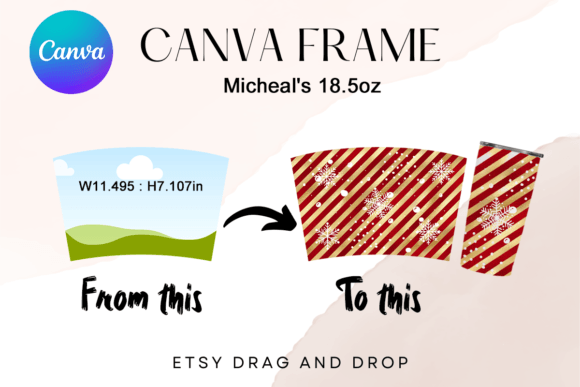
A practical recommendation is to create a separate "design sheet" page in your Canva file. Use this page to experiment with color palettes, font pairings, and logo placements before committing them to the tumbler frame. This keeps your workspace organized. Remember, the template's sizes are approximate. If your specific tumbler model has slightly different dimensions, use Canva's resize feature to adjust the frame proportionally. Test the layout by printing a paper mockup or using Canva's preview functions to check for any awkward breaks in patterns or text.
Considerations for a Polished Final Product
While the template handles the structural layout, the success of your final tumbler still depends on your design decisions. Think about the end-user's experience. How will the tumbler be held? Where will the primary focal point be? Ensure that critical information or key design elements are not placed where a hand would naturally grip the tumbler. This is a subtle aspect of visual hierarchy that impacts usability.
For commercial projects, always verify the licensing of any third-party graphics, fonts, or patterns you use within the template. The template itself is a tool, but the assets you incorporate must be cleared for your intended use, whether for personal gifts or commercial sale. The consistency provided by using the same frame across an entire product line strengthens brand perception. Customers recognize the professional finish, which builds trust and recognition.
Ultimately, the 20oz Spit Canva Frame Tumbler Template is a bridge between digital design and physical production. It removes a significant technical hurdle, allowing you to focus on the creative and strategic aspects of your project. By providing an accurate, editable canvas, it helps ensure that the vibrant design you create on screen translates faithfully onto the curved surface of a finished tumbler, making it a valuable addition to any designer's or maker's toolkit.