Design Professional Mouse Pads in Minutes
Creating a cohesive workspace for your brand or personal project often starts with the details. While many focus on digital assets or print materials, the humble mouse pad remains a powerful branding tool that sits on desks every day. The Mouse Pad Template (4 Size) offers a streamlined solution for anyone looking to produce custom mouse pads without starting from scratch. This digital download provides everything you need to design and produce professional-quality mouse pads across multiple standard dimensions.
What Exactly Is This Mouse Pad Template?
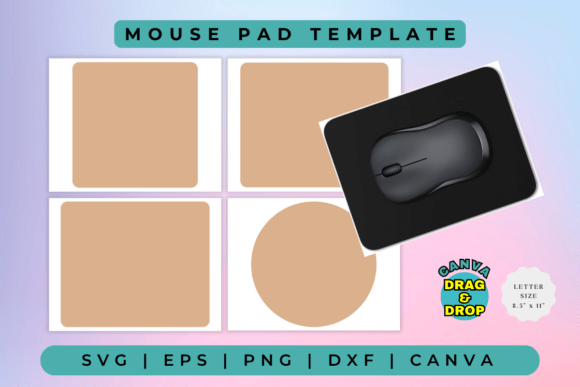
This is a digital design asset—not a physical product. You won't receive a printed mouse pad in the mail. Instead, you get a comprehensive package of editable files that give you complete creative control. The template includes four standard mouse pad sizes, ensuring your design works perfectly whether you're creating a compact pad for travel or a large extended desk mat. The visual style is clean and modern, offering a neutral foundation that adapts to virtually any aesthetic direction you want to take.
The package includes multiple file formats to cover different workflows. A Canva link lets you edit everything directly in your browser—no software installation required. This makes it accessible for entrepreneurs, marketers, and content creators who might not have professional design tools. For those working with cutting machines like Cricut or Silhouette, the SVG and DXF files integrate seamlessly into their respective platforms. The EPS file serves designers working in Adobe Illustrator or CorelDraw, while the PNG file at 300 DPI with a transparent background works beautifully for web previews or print-on-demand uploads.
Who Benefits From a Template Like This?
Small business owners understand the value of branded merchandise. A custom mouse pad featuring your logo, brand colors, or a motivational quote reinforces your brand identity every time someone sits at their desk. The Mouse Pad Template (4 Size) makes this process straightforward. You don't need to hire a designer or spend hours learning complex software. The Canva option means you can drag, drop, and customize within minutes.
Crafters and hobbyists find equal value here. If you sell custom mouse pads at craft fairs or through an online shop, having a reliable template saves enormous time. Instead of measuring and setting up files from scratch for each order, you work within a proven framework. The multiple file formats mean you can adapt to whatever production method suits your needs—whether that's sublimation printing, vinyl cutting, or direct-to-substrate printing.
Content creators and bloggers can use custom mouse pads as merchandise, giveaways, or props for their workspace photography. A well-designed mouse pad featuring your channel branding or a signature phrase becomes a subtle marketing tool that travels with your audience to their offices and homes.
Practical Applications Across Industries
Think beyond simple logo placement. The Mouse Pad Template (4 Size) supports a range of creative applications. Marketing agencies can produce client gifts that feel thoughtful and professional. Event planners can create branded desk accessories for conferences and corporate retreats. Publishers might design mouse pads featuring book cover art as promotional items for author signings or reader communities.
The template's flexibility extends to personal projects too. Design a mouse pad featuring a family photo for a meaningful gift. Create one with a favorite quote for your home office. The high-resolution PNG output ensures crisp details whether you're printing a photograph or a complex graphic design.
How to Get the Most From Your Template
Start by choosing the right size for your project. The four included sizes cover common dimensions, so consider where the mouse pad will be used. A standard size works well for most office desks, while an extended pad suits gaming setups or workstations with larger monitors. Once you've selected your size, open the Canva link and begin customizing.
Pay attention to color contrast and readability. If you're incorporating text—whether a business name, tagline, or personal message—ensure it stands against the background. The template's clean foundation makes this easier, but always preview your design at actual size before committing to production.
For those using the SVG or EPS files, take advantage of the vector format's scalability. You can resize your design without losing quality, which is particularly useful if you decide to offer multiple product sizes in your shop. The DXF file opens directly in Silhouette Basic Edition, making it a practical choice for crafters who prefer that software's interface.
A Smart Addition to Your Design Toolkit
Good design tools save time and reduce frustration. The Mouse Pad Template (4 Size) does exactly that by removing the technical barriers between your idea and a finished product. Whether you're building a product line, creating corporate gifts, or simply personalizing your workspace, having a reliable template means you spend less time on setup and more time on the creative decisions that matter.
The included file formats ensure compatibility with popular design and cutting software, while the Canva option opens the door for anyone with a browser and an internet connection. This combination of accessibility and professional-grade output makes the template a practical investment for designers, entrepreneurs, and hobbyists alike.
Consider how a custom mouse pad fits into your broader branding or creative strategy. Consistency across touchpoints—from business cards to desk accessories—builds recognition and trust. With this template, adding another branded element to your repertoire becomes a simple, efficient process that delivers real-world results.