Create Stunning Content Fast with This Canva eBook Template
If you have ever struggled with a blank page while trying to design a digital product, you know the frustration of creative block. You have the knowledge, the content, and the strategy, but translating that into a polished PDF feels like a massive hurdle. This is where having the right design asset changes everything. The EBook Template for Canva is built specifically to bridge the gap between your raw ideas and a professional, published look. It is not just a collection of pages; it is a functional framework designed for creators who need to move fast without sacrificing quality.
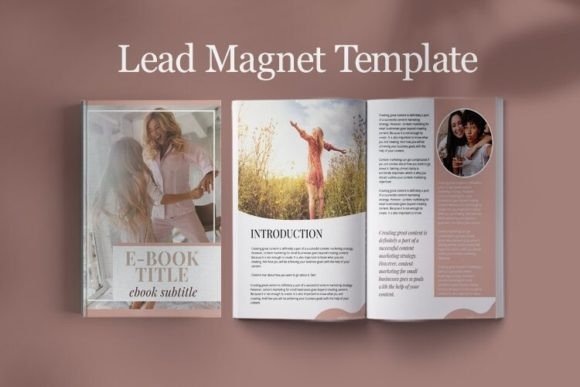
This particular template is optimized for the US Letter size (8.5" by 11"), which remains a standard for readability in the United States and Canada. However, the real value lies in the structure. With 30 distinct page templates included, you have a complete system at your fingertips. It includes two cover page variations to set the mood, two table of contents options for easy navigation, and two "About the Author" pages to build your personal brand. The bulk of the package, however, is the 17 content pages, supplemented by 4 conclusion pages, 2 checklist pages, and a timetable. This variety ensures that your layout never feels repetitive, keeping your audience engaged from the first page to the last.
Visual Style and Personality: Beyond Generic Layouts
The visual personality of this EBook Template for Canva leans heavily into modern typography and clean hierarchy. It avoids the clutter that plagues many DIY designs. Instead, it uses whitespace effectively to let your content breathe. The style is versatile enough to serve as a foundation for corporate reports, creative portfolios, or lifestyle guides. It strikes a balance between professional minimalism and visual interest. You will find that the included layouts support various content types, from dense text blocks to image-heavy sections, making it a flexible tool for visual storytelling.
Because it is a Canva native file, you are working within an ecosystem that allows for drag-and-drop simplicity. This is crucial for bloggers and course creators who may not have advanced skills in complex software like InDesign. The template acts as a guide, showing you where to place headers, body text, and call-to-action buttons. The visual appeal comes from this intentional structure. It forces a level of consistency that elevates your brand identity. When every page follows a logical grid, the reader feels more comfortable, and the content feels more authoritative.
Practical Applications for Entrepreneurs and Creators
Understanding where this template fits into your business strategy is key to getting the most out of it. For course creators, the 17 content pages are perfect for breaking down complex modules into digestible chunks. You can use the checklist pages to summarize key takeaways at the end of a lesson, or use the timetable to outline a 30-day challenge. The "About the Author" pages are not just biographies; they are prime real estate for building trust and linking to your other offers or social media profiles.
For bloggers looking to grow their email list, this eBook template serves as an ideal lead magnet. Instead of offering a plain PDF, you are offering a beautifully designed guide that looks like it took weeks to produce. This perceived value increases the likelihood of a visitor handing over their email address. The template allows you to repurpose your best blog content into a cohesive narrative. You can take a series of related posts, reorganize them using the content pages, add a professional cover, and suddenly you have a digital asset that works for you 24/7.
Design Mechanics: Readability and Visual Hierarchy
A common mistake in self-publishing is neglecting readability. This EBook Template for Canva addresses that by utilizing established design principles. The layouts likely pair a strong sans serif font for headers with a highly legible serif or sans serif for body text. This creates a clear visual hierarchy, guiding the reader’s eye from the main point to the supporting details. Good typography is invisible; it allows the reader to absorb the information without struggling with the formatting.
The template also considers the flow of information. With specific pages dedicated to conclusions and checklists, it encourages a logical progression. You are not just dumping text into a box; you are guiding the user on a journey. This is vital for engagement. If a reader gets lost or overwhelmed by a wall of text, they will close the document. By utilizing the pre-designed content blocks, you ensure that there are natural pauses and visual breaks that make the reading experience enjoyable.
Customization: Making the Template Your Own
While the structure is provided, the customization is where your brand identity comes to life. The EBook Template for Canva is a starting point, not a rigid cage. You can easily swap out fonts to match your existing brand kit. If your brand uses a specific script font for accents or a bold display font for headers, you can integrate those into the template in minutes. This flexibility is what makes it a premium asset. It saves you the hours of layout design while still allowing for complete creative control.
Color is another critical element. You can change the background colors, text colors, and accent elements to match your brand’s palette instantly. This consistency reinforces brand recognition. When a subscriber downloads your eBook, they should immediately recognize it as yours because of the color scheme and typography. This level of professionalism builds trust. It signals that you care about the details, which implies you care about the quality of the content inside the document as well.
Final Thoughts on Workflow and Value
Ultimately, the value of this EBook Template for Canva comes down to efficiency. In the world of digital marketing and content creation, speed is a competitive advantage. Being able to produce a high-quality, 30-page document quickly means you can launch faster, test ideas sooner, and provide more value to your audience. It removes the technical barriers to publishing, allowing you to focus on what you do best: creating content and building your business. Whether you are a seasoned designer or a total beginner, this template provides the scaffolding needed to create something truly professional.